 Web Scraper API

 Google Shopping API
 Google Search API
 Google Maps API
 ChatGPT API
 Glassdoor API

 Trustpilot API
 Crunchbase API
 YouTube API
 TikTok API
 Instagram API
 Google News API
 Reuters API
 Bloomberg API
 Associated Press API
- Use cases
- ChatGPT API
- Google AI Overview API
- Google AI Mode API
- AI visibility
- AI Overview
- Generative engine optimization (GEO)
AI visibility tracking

Kaan Ersoy3 min read
Who runs this, and what for
| Team | What they decide with it |
|---|---|
| Marketing and SEO teams | Which questions the brand is missing from, and whether content and PR work moves the rate month over month. |
| Agencies | What to report to a client about AI search, from numbers they can rerun and check. |
| Founders and product marketers | Which competitors AI answers recommend in their place, and for which buyer questions. |
The calls, step by step
1. ChatGPT answer
GET /v1/chatgpt
2. Google AI Mode answer
GET /v1/google-ai-mode
3. Google AI Overview AI Overview
GET /v1/google-ai-overview
1. Write the questions buyers ask
Use the questions a buyer types before choosing, not your brand name: "best privacy friendly web analytics tools", "google analytics alternatives for small saas". Fifteen to thirty questions across the category give a stable rate; a handful swings with every answer. Keep the list fixed between runs so months compare.
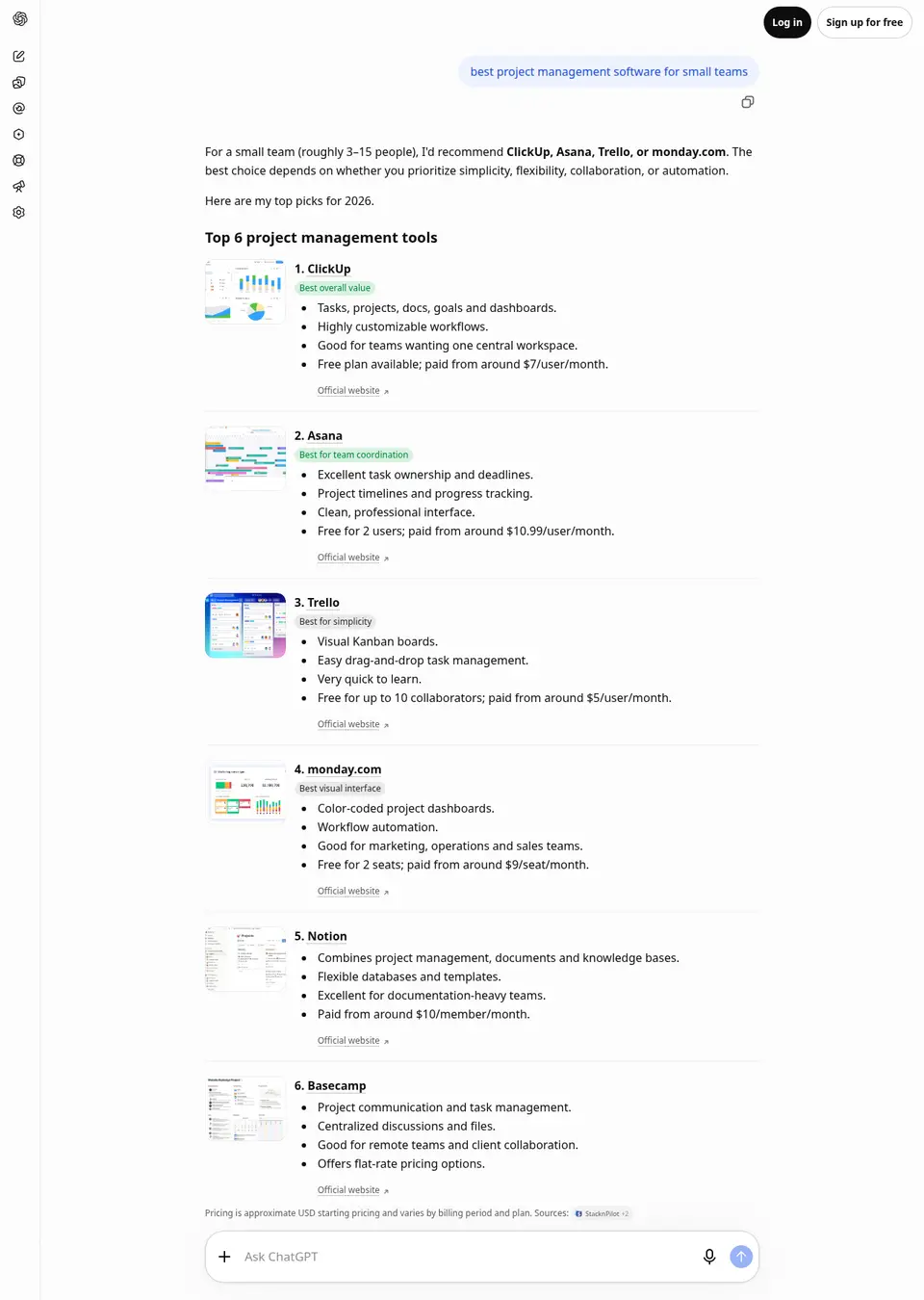
The page on chatgpt.com that this call reads, as a signed-out visitor sees it. The response below is what Clair returns from it. GET /v1/chatgpt?q=best+project+management+software+for+small+teams · query
{
  "q": "best project management software for small teams",
  "country": "us"
}
Recorded response. Live values differ. 2. Ask each engine several times
ChatGPT and Google write every answer anew, so one asking is a sample of one. Ask each question three or more times per engine and count across all of them. Nothing is cached on Clair's side: every request is a fresh answer.
GET /v1/chatgpt?q=best+project+management+software+for+small+teams · answer.text
"For most small teams (3–20 people), I'd recommend Asana, ClickUp, or monday.com. They offer the best balance of task management, collaboration, project visibility, and scalability.\nThe right choice depends on whether you prioritize simplicity, affordability, or customization.\nTop 7 project management tools for small teams\n1. Asana\nBest overall\nEasy to assign tasks, owners, and deadlines.\nGreat project timelines and progress tracking.\nGood for marketing, operations, and cross-functional teams.\nPricing: Free for 2 users; paid from around $10.99/user/month annually.\n2. ClickUp\nBest value\nTasks, documents, goals, dashboards, and collaboration.\nHighly customizable workflows.\nCan replace several separate productivity tools.\nPricing: Free plan; paid from around $7/user/month annually.\n3. monday.com\nBest visual interface\nAttractive, intuitive project boards.\nWorkflow automation and status tracking.\nExcellent for business operations and recurring processes.\nPricing: Free for 2 seats; paid from around $9/seat/month annually.\n4. Trello\nVery easy to learn.\nKanban boards with cards and checklists.\nExcellent for smaller teams with straightforward projects.\nPricing: Free for up to 10 collaborators; paid from $5/user/month annually.\n5. Notion\nCombines project management, documentation, and team knowledge.\nFlexible databases and project dashboards.\nGreat for startups and documentation-heavy teams.\nPricing: Free plan; paid from around $10/member/month annually.\n6. Basecamp\nExcellent team communication.\nCentralizes project discussions, to-dos, and files.\nParticularly useful for remote teams and client projects.\nOffers flat-rate pricing options.\n7. Jira\nExcellent for software development teams.\nSprint planning, issue tracking, and backlogs.\nBetter suited to technical workflows than general business management.\nFree for up to 10 users.\nPricing is approximate US list pricing on annual billing and can change. Sources:\nQuick comparison\nSoftware\nBest for\nEase of use\nAsana\nProject coordination\nVery easy\nClickUp\nAll-in-one management\nModerate\nmonday.com\nVisual workflows\nVery easy\nTrello\nSimple task tracking\nVery easy\nNotion\nDocs + projects\nModerate\nBasecamp\nTeam communication\nEasy\nJira\nSoftware development\nModerate–difficult\nMy recommendation\nChoose Asana if you want a straightforward, professional project management system.\nChoose ClickUp if you want the most functionality for your money.\nChoose monday.com if you want a polished visual interface and workflow automation.\nChoose Trello if you want something simple without much setup.\nLet me narrow it down to the best one for your team\nOne important question: What type of small team are you managing?\n1. What kind of team?\nSmall business / operations\nMarketing / creative agency\nSoftware / technology team\nConsulting / client services\nStartup / general business\nConstruction / field projects\n2. How many people?\n2–3 people\n3–5 people\n6–10 people\n11–20 people\n20+ people\n3. What's most important?\nEasy to use, minimal complexity\nTask tracking and accountability\nProject timelines and deadlines\nTeam collaboration and communication\nAutomation and reporting\nAll-in-one business management\n4. Monthly budget per person?\nPrefer free or under $10/user/month\n$10–$20/user/month\n$20–$30/user/month\nFlexible if the software is worth it"Recorded response. Live values differ. 3. Count mentions and citations
A mention is the brand's name in answer.text; match every way it is written. A citation is the site's domain in answer.citations. They move apart: an answer can recommend a brand while citing a review site, and that review site is where the mention came from.
GET /v1/google-ai-mode?q=best+project+management+software+for+small+teams · answer.citations.0
{
  "position": 1,
  "title": "Project management tool for a very small team with little tech experience",
  "url": "https://www.reddit.com/r/projectmanagement/comments/1vtl07f/project_management_tool_for_a_very_small_team/",
  "domain": "reddit.com"
}
Recorded response. Live values differ. 4. Separate no answer from no mention
Google shows an AI Overview on some searches only. When it shows none, answer is null: count that question as having no overview, not as one where the brand was left out.
GET /v1/google-ai-overview?q=best+project+management+software+for+small+teams · answer
{
  "text": "The best project management tools for small teams depend on your workflow style, budget, and how much structure you need:\nTrello: Best for visual Kanban boards and simplicity. Great for small teams that want an intuitive, card-and-list system with a generous free tier.\nAsana: Best for clean task tracking and ease of use. It is popular for cross-functional projects, marketing teams, and non-technical groups.\nmonday.com: Best for custom workflows and automation. It features a colorful, visual interface and quick setup with pre-built templates.\nClickUp: Best for all-in-one feature depth. It combines tasks, docs, and basic CRM tools with a strong free tier for budget-conscious teams.\nZoho Projects: Best budget-friendly option for teams needing time tracking, Gantt charts, and integration with the Zoho business ecosystem, starting around $4 per user/month.\nNotion: Best for blending project tracking with a team knowledge base or wiki. Ideal for startups, creatives, and solo-to-small teams.\nBasecamp: Best for a minimalist, \"calm\" approach that unifies simple to-dos, file sharing, and direct team chat without complex reporting.\nTo help narrow down the right choice, tell me:\nHow many people are on your team?\nDo you prefer Kanban boards, spreadsheets, or lists?\nDo you need built-in time tracking or client invoicing?",
  "citations": [
    {
      "position": 1,
      "title": "YouTube · George Vlasyev",
      "url": "https://www.youtube.com/watch?v=Q1qUIaUDV5M&vl=en&t=110",
      "domain": "youtube.com"
    },
    {
      "position": 2,
      "title": "Reddit · r/projectmanagement",
      "url": "https://www.reddit.com/r/projectmanagement/comments/1vtl07f/project_management_tool_for_a_very_small_team/",
      "domain": "reddit.com"
    },
    {
      "position": 3,
      "title": "YouTube · George Vlasyev",
      "url": "https://www.youtube.com/watch?v=y30dYbckzfg&vl=en&t=40",
      "domain": "youtube.com"
    },
    {
      "position": 4,
      "title": "Zapier",
      "url": "https://zapier.com/blog/free-project-management-software/",
      "domain": "zapier.com"
    },
    {
      "position": 5,
      "title": "YouTube · Merchant Maverick",
      "url": "https://www.youtube.com/watch?v=VbE1YZCM2ko&t=126",
      "domain": "youtube.com"
    },
    {
      "position": 6,
      "title": "I Ranked Every Project Management Tool (TIER LIST), Video, watch on YouTube",
      "url": "https://www.youtube.com/watch?v=QT07E_rw-b8&t=216",
      "domain": "youtube.com"
    }
  ]
}
Recorded response. Live values differ.
A script to start from
ai_visibility.py
# AI visibility for one brand: how often ChatGPT, Google AI Mode, and Google
# AI Overviews name it, and how often they cite its site, across the
# questions its buyers ask. Each question is asked RUNS times per engine,
# because the answers change from one asking to the next.
import csv, datetime, os, re, requests

API = "https://api.clair.im"
HEADERS = {"Authorization": f"Bearer {os.environ['CLAIR_API_KEY']}"}
BRAND = ["Plausible", "Plausible Analytics"]  # every name it is written as
DOMAIN = "plausible.io"
QUESTIONS = [
    "best privacy friendly web analytics tools",
    "google analytics alternatives for small saas",
    "cookieless website analytics",
]
ENGINES = ["/v1/chatgpt", "/v1/google-ai-mode", "/v1/google-ai-overview"]
RUNS = 3

named = re.compile(r"\b(" + "|".join(map(re.escape, BRAND)) + r")\b", re.I)

def ask(path, q):
    r = requests.get(f"{API}{path}", headers=HEADERS, timeout=150,
                     params={"q": q, "country": "us"})
    r.raise_for_status()
    return r.json()["answer"]  # null when Google showed no AI Overview

def cites(answer):
    return any(c["domain"] == DOMAIN or (c["domain"] or "").endswith("." + DOMAIN)
               for c in answer["citations"])

today = datetime.date.today().isoformat()
with open("visibility.csv", "a", newline="") as f:
    out = csv.writer(f)
    for path in ENGINES:
        for q in QUESTIONS:
            answers = []
            for _ in range(RUNS):
                try:
                    answers.append(ask(path, q))
                except requests.HTTPError as e:
                    print(path, q, e.response.status_code)
            shown = [a for a in answers if a]
            out.writerow([
                today, path.removeprefix("/v1/"), q, len(answers), len(shown),
                sum(bool(named.search(a["text"])) for a in shown),
                sum(cites(a) for a in shown),
            ])
Set CLAIR_API_KEY to your Clair key; one plan covers the ChatGPT API and Google AI Overview API and Google AI Mode API. Each call spends that API's rate from the plan's monthly balance.
What it costs per month
| Schedule | Requests | Plan | Per month | Per 1,000 |
|---|---|---|---|---|
| 20 questions, monthly20 questions × 3 askings on each of 3 engines, once a month. | 180 | Starter | $30 | $166.67 |
| 30 questions, weekly30 questions × 3 askings × 3 engines × 4 weekly runs. | 1,080 | Starter | $30 | $27.78 |
| 10 clients × 25 questions, weekly250 questions × 3 askings × 3 engines × 4 weekly runs. | 9,000 | Standard | $100 | $11.11 |
| 50 questions, ChatGPT only, daily50 questions × 3 askings × 30 days. | 4,500 | Standard | $100 | $22.22 |
What to plan for
- Every answer is a sample. A rate from three askings of twenty questions moves by several points between runs for no reason; read trends over weeks, not one run.
- The answers are the signed-out ones, from the country you choose. Signed-in users get answers shaped by their history, which no outside tool sees.
- Each request is a new question. Follow-up questions in the same conversation, where buyers often narrow down to one product, are not asked.
- Matching a brand in text is literal. A brand with a common-word name needs its patterns written with care, or it counts mentions that are not about it.
- ChatGPT sometimes names a source by its site only; that citation has a domain and no url.
Common questions
How many times should I ask each question?
Three is a practical minimum; five steadies the rate further. The more questions you track, the less each one's repeats matter, because the rate averages across them.
Will these numbers match other AI visibility tools?
Not to the decimal, since every tool samples different answers. Asked the same questions on the same engines, the rates should move the same way: when a brand gains in one, it gains in the others.
How is this different from rank tracking?
A search result has a position that holds for days. An AI answer has no fixed list: a brand is in it or not, each time it is written. So AI visibility is a rate across askings, not a rank.
Should I track ChatGPT, AI Mode, and AI Overviews separately?
Yes. They cite different sites and recommend differently for the same question, and a brand strong in one can be absent from another.