 Web Scraper API

 Google Shopping API
 Google Search API
 Google Maps API
 ChatGPT API
 Glassdoor API

 Trustpilot API
 Crunchbase API
 YouTube API
 TikTok API
 Instagram API
 Google News API
 Reuters API
 Bloomberg API
 Associated Press API
Amazon price monitoring

Kaan Ersoy2 min read
Who runs this, and what for
| Team | What they decide with it |
|---|---|
| Brands | Which sellers undercut the minimum advertised price, and when the brand loses the Buy Box on its own products. |
| Marketplace sellers | When a competitor changes price on a shared ASIN, to reprice before losing the Buy Box. |
| Retail analysts | How prices and discounts move across a category over weeks, for pricing studies and reports. |
The calls, step by step
1. Amazon search
GET /v1/amazon/search
2. Amazon product details
GET /v1/amazon/product
3. Amazon product offers
GET /v1/amazon/offers
1. Build the ASIN list
Start from the products you care about. If you have barcodes, the GTIN lookup endpoint turns a UPC, EAN, or ISBN into its ASIN. To watch a category instead, search with category_id or read the best-seller list, and keep the ASINs from results[].
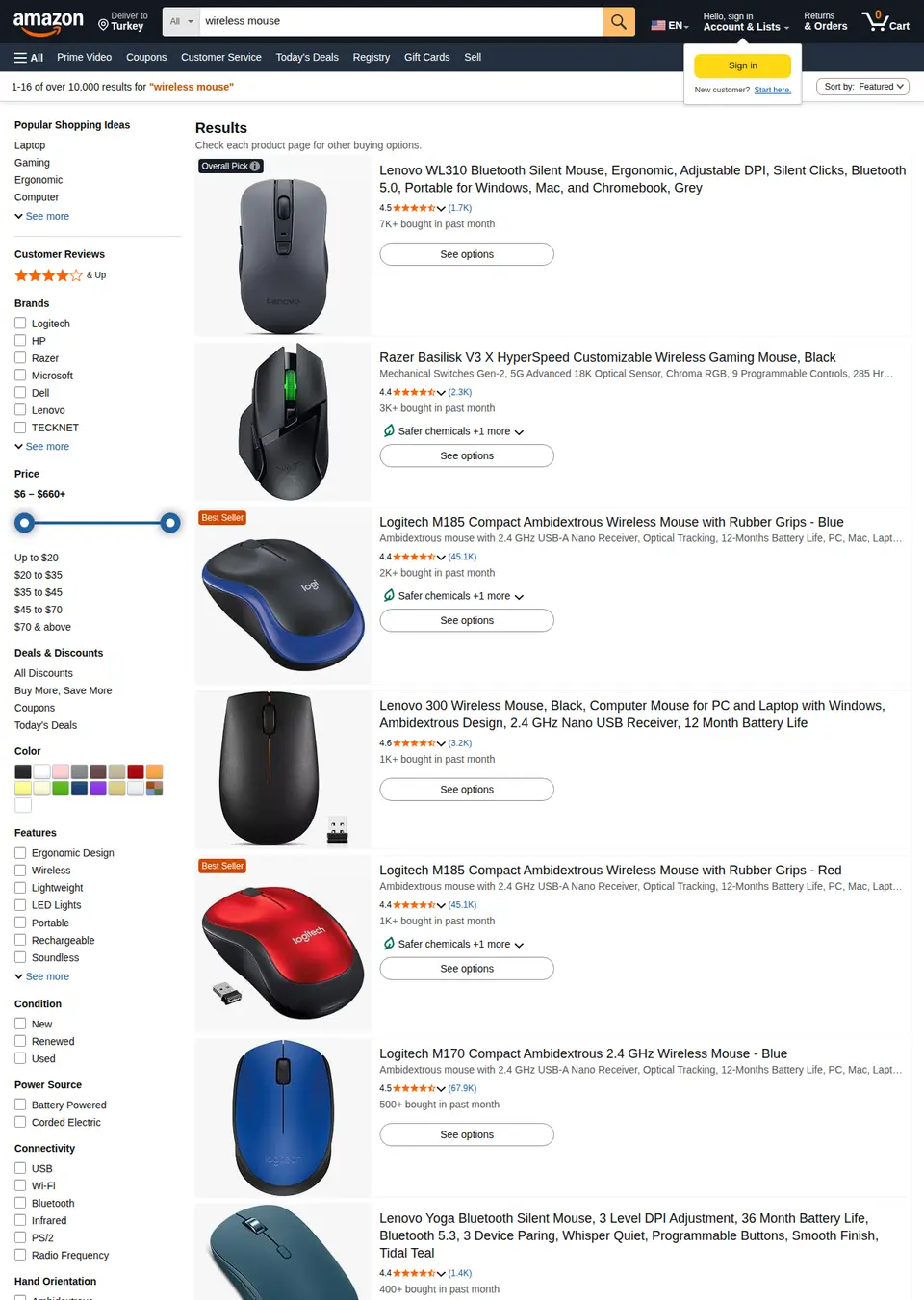
The page on amazon.com that this call reads, as a signed-out visitor sees it. The response below is what Clair returns from it. GET /v1/amazon/search?q=wireless+mouse&prime=true&page=1 · results.0
{
  "position": 1,
  "asin": "B004YAVF8I",
  "title": "Logitech M185 Compact Ambidextrous 2.4 GHz Wireless Mouse - Swift Grey",
  "url": "https://www.amazon.com/dp/B004YAVF8I",
  "price_text": "$13.99",
  "price": 13.99,
  "currency": "USD",
  "original_price_text": "$17.99",
  "original_price": 17.99,
  "rating": 4.4,
  "ratings_count": 45089,
  "badge": "Overall Pick",
  "sales_volume": "10K+ bought in past month",
  "image_url": "https://m.media-amazon.com/images/I/51WN5aXZWIL._AC_UY218_.jpg",
  "sponsored": false,
  "is_prime": true,
  "delivery": "FREE delivery Tomorrow, Sep 26",
  "coupon": null,
  "other_offers": {
    "min_price_text": "$6.58",
    "min_price": 6.58,
    "offers_count": 8
  }
}
Recorded response. Live values differ. 2. Snapshot each product on a schedule
Call the product endpoint for each ASIN with the zip_code of the market you sell into. It returns the Buy Box price, the list price Amazon strikes through (original_price), availability, and the Buy Box seller in sold_by. Store every response with a timestamp: Amazon has no price history to fetch later, so your snapshots are the history.
GET /v1/amazon/product?asin=B0CF3VGQFL · product
{
  "asin": "B0CF3VGQFL",
  "title": "Redragon Mechanical Gaming Keyboard",
  "brand": "Redragon",
  "authors": [],
  "url": "https://www.amazon.com/dp/B0CF3VGQFL",
  "price_text": "$29.99",
  "price": 29.99,
  "currency": "USD",
  "original_price_text": null,
  "original_price": null,
  "availability": "In Stock",
  "sold_by": {
    "seller_id": "A3ODNP7R491D62",
    "name": "Redragon Official"
  },
  "ships_from": "Amazon",
  "delivery": "FREE delivery September 28 - 30 on orders shipped by Amazon over $35",
  "delivery_location": "New York 10001",
  "rating": 4.3,
  "ratings_count": 6819,
  "rating_distribution": [
    {
      "stars": 5,
      "percent": 69
    },
    {
      "stars": 4,
      "percent": 12
    },
    {
      "stars": 3,
      "percent": 7
    },
    {
      "stars": 2,
      "percent": 4
    },
    {
      "stars": 1,
      "percent": 8
    }
  ],
  "image_url": "https://m.media-amazon.com/images/I/71Bk2A2WmOL._AC_SL1500_.jpg",
  "images": [
    "https://m.media-amazon.com/images/I/71Bk2A2WmOL._AC_SL1500_.jpg"
  ],
  "bullets": [
    "11 backlight modes and hot-swappable switches."
  ],
  "description": null,
  "categories": [
    "Electronics",
    "Computers & Accessories",
    "Keyboards"
  ],
  "best_sellers_rank": [
    {
      "rank": 12,
      "category": "PC Gaming Keyboards"
    }
  ],
  "specifications": {
    "Switch Type": "Linear",
    "Number of Keys": "104"
  },
  "identifiers": {
    "isbn_10": null,
    "isbn_13": null,
    "upc": null,
    "model_number": "K671"
  },
  "variants": [
    {
      "asin": "B0FJL64Y65",
      "selected": false,
      "attributes": {
        "Color": "Deep Black"
      }
    }
  ],
  "formats": []
}
Recorded response. Live values differ. 3. Read every seller when the Buy Box moves
When sold_by changes or the price drops past a threshold, call the offers endpoint for that ASIN. It lists every seller's price, condition, delivery, and rating, which tells you who undercut and by how much. Calling it only on change keeps the monthly count close to the product calls.
GET /v1/amazon/offers?asin=1098145356 · results.0
{
  "position": 1,
  "condition": "New",
  "price_text": "$40.94",
  "price": 40.94,
  "currency": "USD",
  "original_price_text": "$65.99",
  "original_price": 65.99,
  "delivery": "$33.04 delivery October 14 - 30.",
  "ships_from": "Pensive Keyboard Books",
  "seller": {
    "seller_id": "A245R8VFMDKNT1",
    "name": "Pensive Keyboard Books",
    "rating": 3,
    "ratings_count": 225,
    "positive_percent": 52
  }
}
Recorded response. Live values differ.
A script to start from
price_snapshot.py
# Daily price and Buy Box snapshot for a list of ASINs.
# Appends one row per ASIN to prices.csv; diff consecutive days to alert.
import csv, datetime, os, requests

API = "https://api.clair.im"
HEADERS = {"Authorization": f"Bearer {os.environ['CLAIR_API_KEY']}"}
ASINS = ["B0CF3VGQFL", "B004YAVF8I", "B015NBTAOW"]
ZIP = "10001"  # prices and the Buy Box follow the delivery location

def product(asin):
    r = requests.get(f"{API}/v1/amazon/product", headers=HEADERS, timeout=60,
                     params={"asin": asin, "zip_code": ZIP})
    r.raise_for_status()
    return r.json()["product"]

today = datetime.date.today().isoformat()
with open("prices.csv", "a", newline="") as f:
    out = csv.writer(f)
    for asin in ASINS:
        try:
            p = product(asin)
        except requests.HTTPError as e:
            print(asin, e.response.status_code, e.response.text[:200])
            continue
        seller = p["sold_by"] or {}
        out.writerow([today, asin, p["price"], p["currency"],
                      p["original_price"], p["availability"],
                      seller.get("seller_id"), seller.get("name"),
                      p["rating"], p["ratings_count"]])
Set CLAIR_API_KEY to your Clair key; one plan covers the Amazon API. Each call spends that API's rate from the plan's monthly balance.
What it costs per month
| Schedule | Requests | Plan | Per month | Per 1,000 |
|---|---|---|---|---|
| 100 ASINs, once a day100 × 30 days = 3,000 product calls, plus about 300 offers calls on Buy Box changes (10%). | 3,300 | Starter | $30 | $9.09 |
| 500 ASINs, once a day500 × 30 = 15,000 product calls, plus about 1,500 offers calls. | 16,500 | Standard | $100 | $6.06 |
| 200 ASINs, every 4 hours200 × 6 checks × 30 = 36,000 product calls, plus about 3,600 offers calls. | 39,600 | Advanced | $300 | $7.58 |
| 1,000 ASINs, twice a day1,000 × 2 × 30 = 60,000 product calls, plus about 6,000 offers calls. | 66,000 | Advanced | $300 | $4.55 |
Response times
| Amazon API | |
|---|---|
| Succeeded | 6 of 7 |
| Median response time | 15.1 s |
| 95th percentile | 18.5 s |
| Had price | 83% |
| Had availability | 100% |
| Had sold by | 100% |
| Had rating | 100% |
| Had best sellers rank | 100% |
| Had variants | 83% |
What to plan for
- Prices are the ones a shopper at zip_code sees. Without zip_code Amazon picks a default location, which may not be your market, and a different location can mean a different Buy Box winner.
- Each call is billed, and Clair keeps a fetched page for at most ten minutes, so a repeat inside that window returns the same snapshot. There is no bulk history: to have last month's prices you need to have collected them last month.
- Coupons are shown on search result cards (coupon) rather than on the product response. If coupon-adjusted prices matter, add a search call for the product.
- Ten marketplaces are supported: us, gb, ca, au, in, de, es, nl, be, and jp. The same ASIN can differ, or not exist, across them.
- A request that fails on Clair's side (5xx) is refunded. Retry it; do not treat a failed snapshot as a price change.
Common questions
How often should I check prices?
Match it to how you act on changes. Once a day is enough for reports and MAP checks. Repricing against active competitors usually needs every few hours on the ASINs that change, and daily on the rest.
Does this show the price for Prime members?
It shows the price a signed-out shopper at that delivery location sees. Member-only deals are not visible without an account.
Can I get historical Amazon prices?
No. Clair reads the page as it is now. Start collecting snapshots today and the history builds from there.
What does it cost per product?
One product check is one request. The table above prices common schedules on the cheapest plan for each volume.