 Web Scraper API

 Google Shopping API
 Google Search API
 Google Maps API
 ChatGPT API
 Glassdoor API

 Trustpilot API
 Crunchbase API
 YouTube API
 TikTok API
 Instagram API
 Google News API
 Reuters API
 Bloomberg API
 Associated Press API
Amazon rating monitoring

Kaan Ersoy2 min read
Who runs this, and what for
| Team | What they decide with it |
|---|---|
| Brands and sellers | Whether a product batch, packaging, or listing change hurt ratings. |
| Category analysts | How ratings compare across a category, as a quality signal. |
The calls, step by step
1. Amazon product details
GET /v1/amazon/product
2. Amazon product reviews
GET /v1/amazon/reviews
1. Snapshot the rating and distribution
The product endpoint returns the product's rating, ratings count, and distribution as the percentage of ratings at each star, on every marketplace including amazon.com. Store it with the date; Amazon shows only the current numbers.
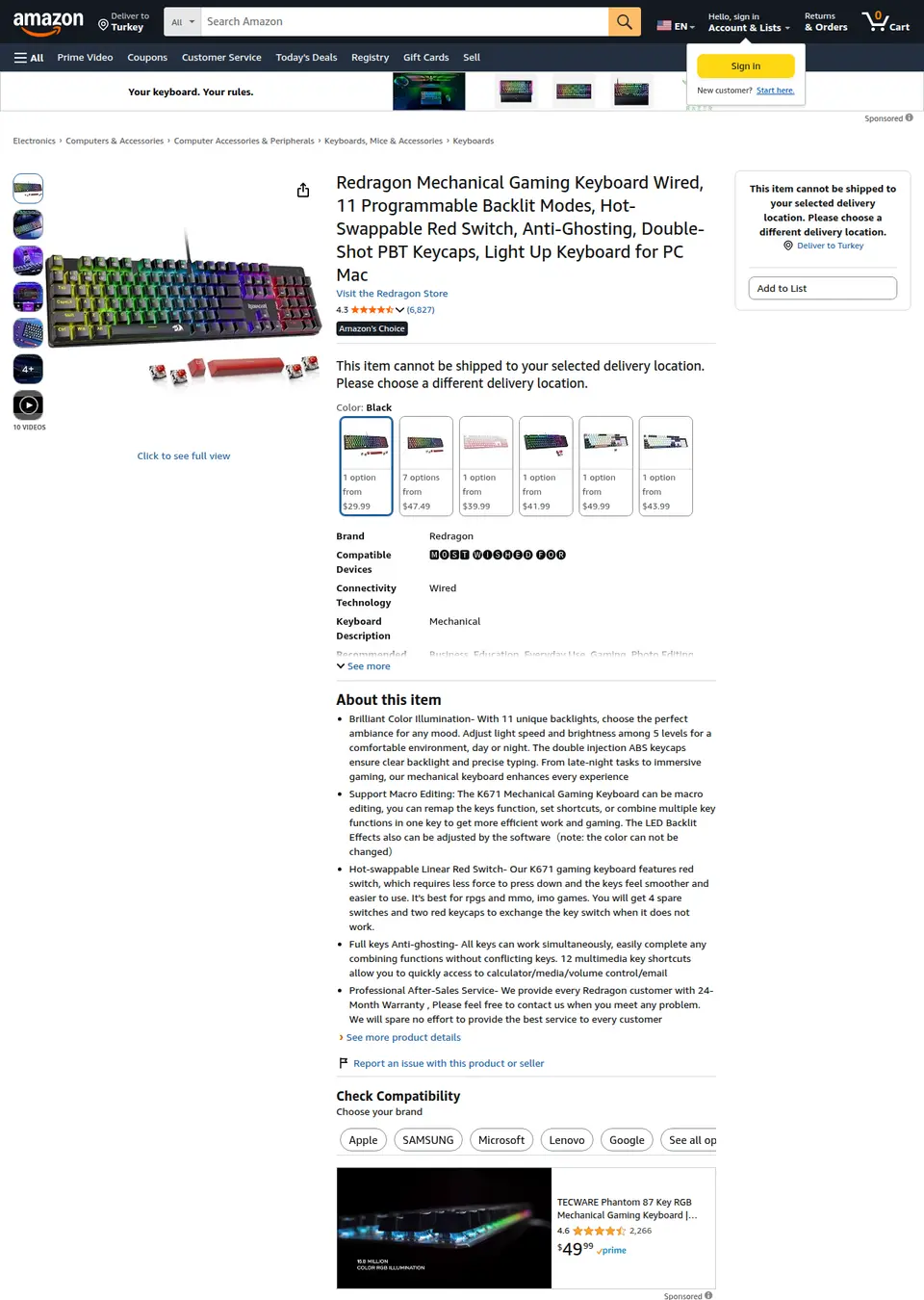
The page on amazon.com that this call reads, as a signed-out visitor sees it. The response below is what Clair returns from it. GET /v1/amazon/product?asin=B0CF3VGQFL · product.rating_distribution
[
  {
    "stars": 5,
    "percent": 69
  },
  {
    "stars": 4,
    "percent": 12
  },
  {
    "stars": 3,
    "percent": 7
  },
  {
    "stars": 2,
    "percent": 4
  },
  {
    "stars": 1,
    "percent": 8
  }
]
Recorded response. Live values differ. 2. Read the reviews shown
Outside amazon.com, the reviews endpoint returns the reviews the product page shows signed-out shoppers, up to about 13, with rating, title, text, date, verified purchase, and the variant bought. Flag the 1- and 2-star ones.
GET /v1/amazon/reviews?asin=B0CF3VGQFL&country=ca · results.0
{
  "review_id": "RTVMWBZE2ID5P",
  "title": "Smooooth",
  "body": "TLDR: for the price it’s a nice entry level mechanical keyboard to get into mechanical keyboards without braking the bank.",
  "rating": 5,
  "author": "FreddyTheBearCat",
  "date": "2026-08-03",
  "country": "Canada",
  "verified_purchase": true,
  "variant": "Colour Name: Deep Blacck",
  "helpful_votes_count": null,
  "url": "https://www.amazon.ca/gp/customer-reviews/RTVMWBZE2ID5P"
}
Recorded response. Live values differ. 3. Tie ratings to rank
The same product response has Best Sellers Rank per category. Ratings falling while rank holds is a warning; both falling is a problem.
GET /v1/amazon/product?asin=B0CF3VGQFL · product.best_sellers_rank
[
  {
    "rank": 12,
    "category": "PC Gaming Keyboards"
  }
]
Recorded response. Live values differ.
A script to start from
amazon_ratings.py
# Weekly rating snapshot for your products and competitors on Amazon,
# with the share of 1- and 2-star ratings and any new critical reviews.
import csv, datetime, os, requests

API = "https://api.clair.im"
HEADERS = {"Authorization": f"Bearer {os.environ['CLAIR_API_KEY']}"}
ASINS = ["B0CF3VGQFL", "B004YAVF8I"]
COUNTRY = "gb"  # reviews are not available on amazon.com (us); ratings are

def get(path, **params):
    r = requests.get(f"{API}{path}", headers=HEADERS, timeout=90,
                     params={**params, "country": COUNTRY})
    r.raise_for_status()
    return r.json()

today = datetime.date.today().isoformat()
with open("ratings.csv", "a", newline="") as f:
    out = csv.writer(f)
    for asin in ASINS:
        p = get("/v1/amazon/product", asin=asin)["product"]
        dist = p["rating_distribution"] or []
        low = sum(d["percent"] for d in dist if d["stars"] <= 2)  # percent of ratings
        out.writerow([today, asin, p["rating"], p["ratings_count"], low])
        if COUNTRY == "us":
            continue
        for review in get("/v1/amazon/reviews", asin=asin)["results"]:
            if review["rating"] <= 2:
                print(f"{asin} {review['rating']} stars {review['date']}: {review['title']}")
Set CLAIR_API_KEY to your Clair key; one plan covers the Amazon API. Each call spends that API's rate from the plan's monthly balance.
What it costs per month
| Schedule | Requests | Plan | Per month | Per 1,000 |
|---|---|---|---|---|
| 50 ASINs, weekly50 × 4 weeks × (product + reviews) = 400 requests. | 400 | Starter | $30 | $75 |
| 500 ASINs on amazon.com, weekly, ratings only500 × 4 weeks × product = 2,000 requests. | 2,000 | Starter | $30 | $15 |
| 200 ASINs, daily200 × 30 × (product + reviews) = 12,000 requests. | 12,000 | Standard | $100 | $8.33 |
Response times
| Amazon API | |
|---|---|
| Succeeded | 6 of 7 |
| Median response time | 15.1 s |
| 95th percentile | 18.5 s |
| Had price | 83% |
| Had availability | 100% |
| Had sold by | 100% |
| Had rating | 100% |
| Had best sellers rank | 100% |
| Had variants | 83% |
What to plan for
- amazon.com shows reviews only to signed-in shoppers, so review text is not available for the US marketplace; ratings and the distribution are. Elsewhere the product page shows up to about 13 reviews and puts the full list behind sign-in, so this does not collect every review.
- The distribution is in whole percentages, so small shifts on products with few ratings are rounding.
- Ratings and reviews are per marketplace. Check each country separately.
Common questions
Does this work on amazon.com?
The rating, ratings count, and distribution do. Review text does not: amazon.com shows reviews only to signed-in shoppers, and Clair does not sign in, so the reviews endpoint returns 400 for country=us without a charge.
Can I download all reviews for a product?
No. Amazon requires sign-in for the full review list, and Clair does not sign in. Snapshot weekly to collect new reviews as they appear among those shown.
What is the difference between ratings and reviews?
A rating is stars only; a review adds text. ratings_count counts both, and is usually many times the number of written reviews.
How often should I check?
Weekly for most products. Daily for a launch or after a change, when the first reviews come in.