 Web Scraper API

 Google Shopping API
 Google Search API
 Google Maps API
 ChatGPT API
 Glassdoor API

 Trustpilot API
 Crunchbase API
 YouTube API
 TikTok API
 Instagram API
 Google News API
 Reuters API
 Bloomberg API
 Associated Press API
AI Overview tracking for SEO keywords

Kaan Ersoy2 min read
Who runs this, and what for
| Team | What they decide with it |
|---|---|
| SEO teams | Which keywords to work on for an AI Overview citation, and which rankings have lost their clicks to an overview. |
| Content leads | Which pages to restructure so an overview quotes them, judged by the pages it cites today. |
| Agencies | What to add to the monthly rank report now that a first position can sit below an answer. |
The calls, step by step
1. Google AI Overview AI Overview
GET /v1/google-ai-overview
2. Google Search search
GET /v1/google-search
1. Check for an overview
Call the AI Overview endpoint with each keyword. answer is null when Google shows no overview for it; that is an answer, and it is billed. Track the share of your keywords that show one, since it changes as Google expands overviews.
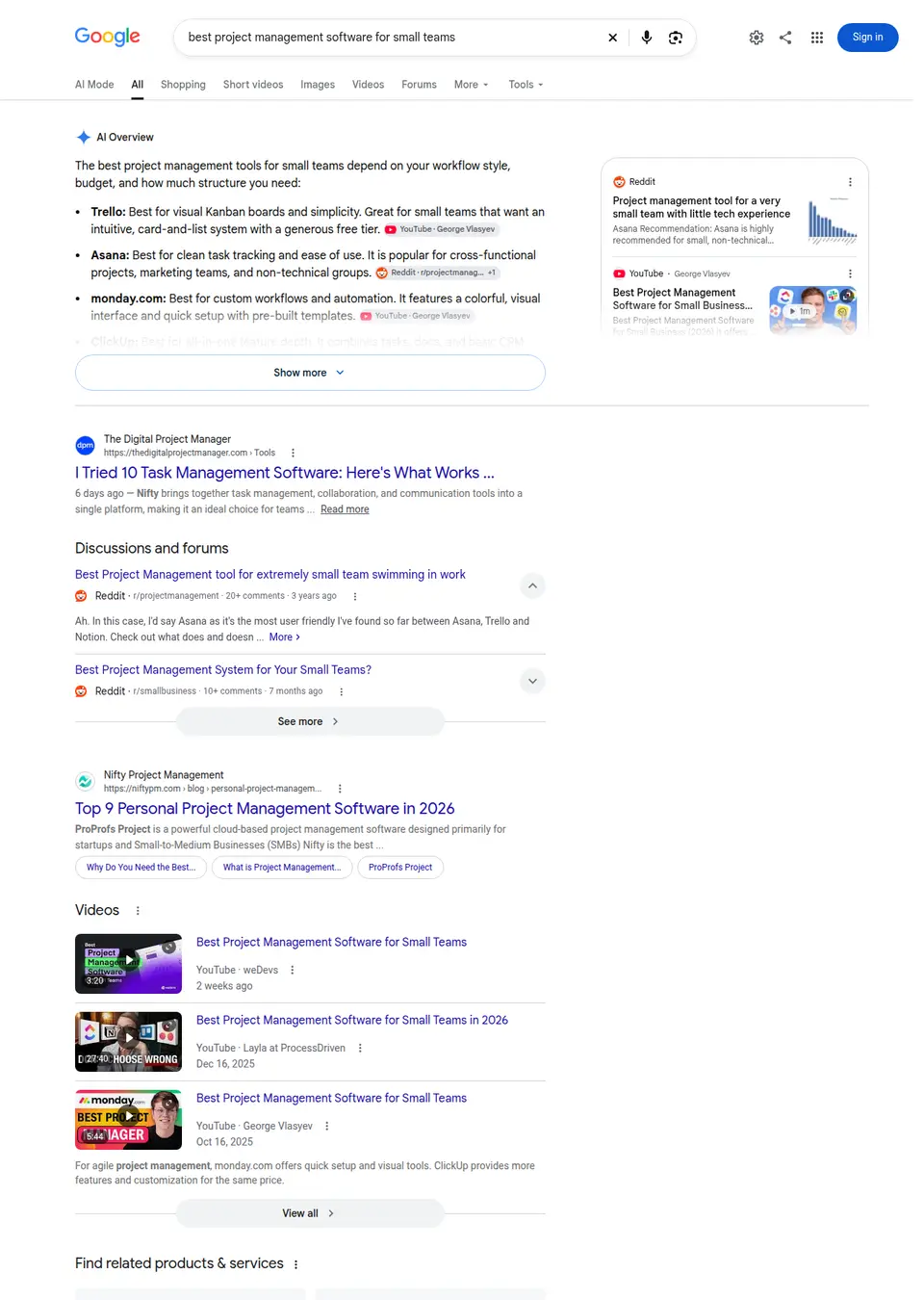
The page on google.com that this call reads, as a signed-out visitor sees it. The response below is what Clair returns from it. GET /v1/google-ai-overview?q=best+project+management+software+for+small+teams · answer
{
  "text": "The best project management tools for small teams depend on your workflow style, budget, and how much structure you need:\nTrello: Best for visual Kanban boards and simplicity. Great for small teams that want an intuitive, card-and-list system with a generous free tier.\nAsana: Best for clean task tracking and ease of use. It is popular for cross-functional projects, marketing teams, and non-technical groups.\nmonday.com: Best for custom workflows and automation. It features a colorful, visual interface and quick setup with pre-built templates.\nClickUp: Best for all-in-one feature depth. It combines tasks, docs, and basic CRM tools with a strong free tier for budget-conscious teams.\nZoho Projects: Best budget-friendly option for teams needing time tracking, Gantt charts, and integration with the Zoho business ecosystem, starting around $4 per user/month.\nNotion: Best for blending project tracking with a team knowledge base or wiki. Ideal for startups, creatives, and solo-to-small teams.\nBasecamp: Best for a minimalist, \"calm\" approach that unifies simple to-dos, file sharing, and direct team chat without complex reporting.\nTo help narrow down the right choice, tell me:\nHow many people are on your team?\nDo you prefer Kanban boards, spreadsheets, or lists?\nDo you need built-in time tracking or client invoicing?",
  "citations": [
    {
      "position": 1,
      "title": "YouTube · George Vlasyev",
      "url": "https://www.youtube.com/watch?v=Q1qUIaUDV5M&vl=en&t=110",
      "domain": "youtube.com"
    },
    {
      "position": 2,
      "title": "Reddit · r/projectmanagement",
      "url": "https://www.reddit.com/r/projectmanagement/comments/1vtl07f/project_management_tool_for_a_very_small_team/",
      "domain": "reddit.com"
    },
    {
      "position": 3,
      "title": "YouTube · George Vlasyev",
      "url": "https://www.youtube.com/watch?v=y30dYbckzfg&vl=en&t=40",
      "domain": "youtube.com"
    },
    {
      "position": 4,
      "title": "Zapier",
      "url": "https://zapier.com/blog/free-project-management-software/",
      "domain": "zapier.com"
    },
    {
      "position": 5,
      "title": "YouTube · Merchant Maverick",
      "url": "https://www.youtube.com/watch?v=VbE1YZCM2ko&t=126",
      "domain": "youtube.com"
    },
    {
      "position": 6,
      "title": "I Ranked Every Project Management Tool (TIER LIST), Video, watch on YouTube",
      "url": "https://www.youtube.com/watch?v=QT07E_rw-b8&t=216",
      "domain": "youtube.com"
    }
  ]
}
Recorded response. Live values differ. 2. Find your citation
When there is an overview, look for your domain in answer.citations. Its position is where the overview lists your page among its sources. The overview's text tells you what it says about the topic, and which brands it names.
GET /v1/google-ai-overview?q=best+project+management+software+for+small+teams · answer.citations.0
{
  "position": 1,
  "title": "YouTube · George Vlasyev",
  "url": "https://www.youtube.com/watch?v=Q1qUIaUDV5M&vl=en&t=110",
  "domain": "youtube.com"
}
Recorded response. Live values differ. 3. Put it next to your rank
Call the Google Search endpoint for the same keyword and country to read your organic position. A high rank under an overview that cites competitors is the case to act on first.
GET /v1/google-search?q=albert+einstein&country=us&page=1 · results.0
{
  "position": 1,
  "title": "Albert Einstein",
  "url": "https://en.wikipedia.org/wiki/Albert_Einstein",
  "source": "Wikipedia",
  "displayed_url": "https://en.wikipedia.org › wiki › Albert_Einstein",
  "date": null,
  "snippet": "Albert Einstein (14 March 1879 – 18 April 1955) was a German-born theoretical physicist ...",
  "sitelinks": []
}
Recorded response. Live values differ.
A script to start from
ai_overviews.py
# For each keyword: does Google show an AI Overview, does it cite your site,
# and where does your site rank in the organic results below it?
import csv, datetime, os, requests
from urllib.parse import urlparse

API = "https://api.clair.im"
HEADERS = {"Authorization": f"Bearer {os.environ['CLAIR_API_KEY']}"}
DOMAIN = "example.com"
KEYWORDS = ["payment api", "accept payments online", "invoice software"]
COUNTRY = "us"

def get(path, **params):
    r = requests.get(f"{API}{path}", headers=HEADERS, timeout=90,
                     params={**params, "country": COUNTRY})
    r.raise_for_status()
    return r.json()

def ours(domain):
    domain = (domain or "").removeprefix("www.")
    return domain == DOMAIN or domain.endswith("." + DOMAIN)

today = datetime.date.today().isoformat()
with open("ai_overviews.csv", "a", newline="") as f:
    out = csv.writer(f)
    for q in KEYWORDS:
        overview = get("/v1/google-ai-overview", q=q)["answer"]
        serp = get("/v1/google-search", q=q, language="en")
        rank = next((r["position"] for r in serp["results"]
                     if ours(urlparse(r["url"]).hostname)), None)
        if overview is None:
            out.writerow([today, q, "no overview", "", "", rank])
            continue
        hit = next((c for c in overview["citations"] if ours(c["domain"])), None)
        out.writerow([today, q, "overview", len(overview["citations"]),
                      hit["position"] if hit else "", rank])
Set CLAIR_API_KEY to your Clair key; one plan covers the Google AI Overview API and Google Search API. Each call spends that API's rate from the plan's monthly balance.
What it costs per month
| Schedule | Requests | Plan | Per month | Per 1,000 |
|---|---|---|---|---|
| 100 keywords, weekly100 keywords × 4 weekly runs, one overview and one results page each. | 800 | Starter | $30 | $37.50 |
| 500 keywords, weekly500 keywords × 4 weekly runs. | 4,000 | Starter | $30 | $7.50 |
| 200 keywords, daily200 keywords × 30 days. | 12,000 | Standard | $100 | $8.33 |
| 2,000 keywords, monthly2,000 keywords, once a month. | 4,000 | Starter | $30 | $7.50 |
Response times
| Google Search API | |
|---|---|
| Succeeded | 18 of 20 |
| Median response time | 6.2 s |
| 95th percentile | 25.2 s |
| Had knowledge graph | 28% |
| Had people also ask | 94% |
| Had related searches | 78% |
| Had local results | 11% |
| Had videos | 33% |
What to plan for
- Overviews come and go: the same keyword can show one on Monday and none on Tuesday. Track the share of days with an overview, not one check.
- The search is signed out and unpersonalized, from the country you choose. Searchers who are signed in can see a different overview, or none.
- Only the first results page is read for the rank in this script; add pages for keywords where you rank lower.
- Google's product cards are not counted as citations, so a product named in the overview without a source link does not count as cited.
Common questions
Does the Google Search API return the AI Overview?
No. The overview needs a browser to load and has its own API and price. Use both, as this pipeline does, for the full picture of one keyword.
Does Search Console show AI Overview clicks?
Google counts them in the Performance report's Web totals, with no separate report. It does not show the overview or which sources it cited.
Is the text behind Show more included?
Yes. Google loads the whole overview and folds it; Clair reads all of it.